CaravanConcierge
Designed in New Zealand

Run the whole shop from one place.

Bookings, jobs, quotes, invoices, parts, claims and compliance, all in one tidy place. It's made by Kiwis for Kiwi caravan workshops, so it works the way you already do.

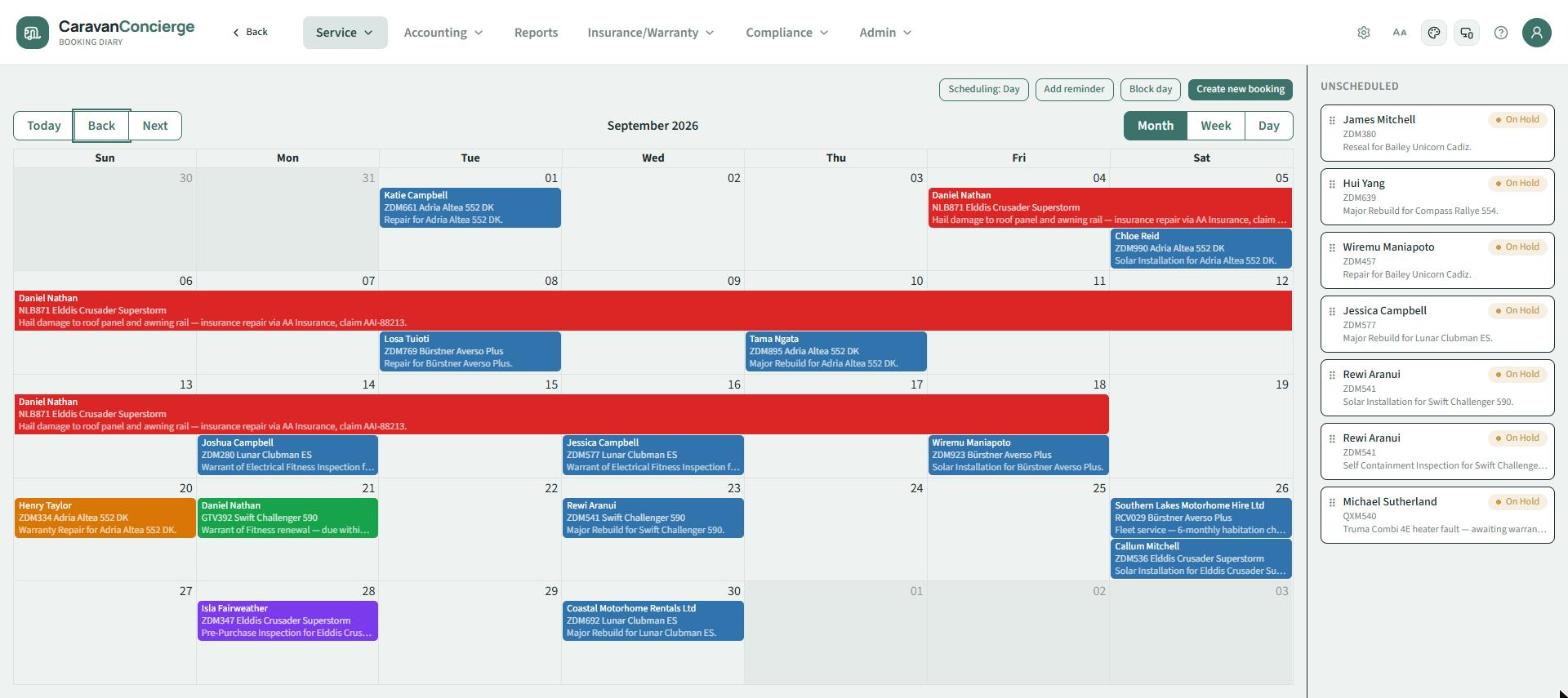
The booking diary: a month of caravan jobs as coloured bars across the calendar, with unscheduled jobs waiting in a queue on the right.

The booking diary: a whole month at a glance, with jobs still to be booked waiting on the right.

A quick tour

Every screen tells you what's next.

Each job, invoice, claim and inspection has a coloured banner across the top that says where it's up to, what's owed, and the one thing to do next. Nothing gets forgotten at the end of a job.

A job screen with a green banner reading Looks finished, Booked time is over and work is recorded, with a Mark complete button.

Jobs that finish themselves off.

When every task is ticked and nobody's clocked on, the job says it looks finished and offers Mark complete. Finalize the invoice and the job moves to Invoiced on its own.

  • Bookings ask what needs doing, so nobody takes a phone booking with no details.
  • See who's working on it, time and parts used, and its whole history.
  • Customers are told it's ready, and you can see who hasn't been.
An invoice screen with a red banner reading Overdue, 69 days overdue, $542.74 overdue, and a Record payment button.

Always know who owes what.

Invoices turn amber when part-paid and red the day after they're due, with how much is outstanding right there. Record a payment in two clicks.

  • Quotes, invoices, bills, purchase orders and credit notes all work the same way.
  • Connect Xero and every dollar flows across, or run your own accounts and GST.
  • A van waiting for pickup that hasn't been invoiced stays orange until it is.
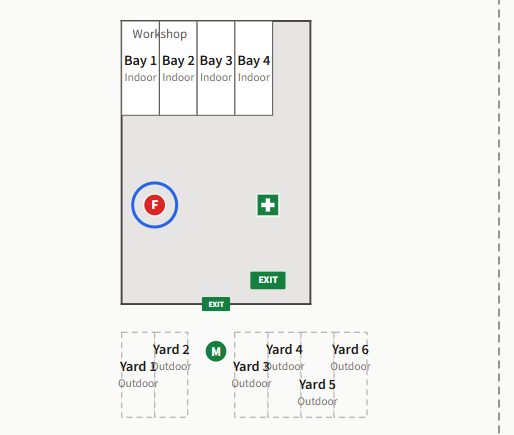
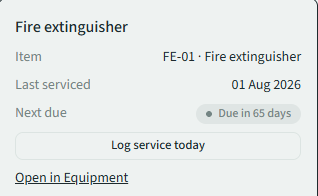
The workshop floor map: a building with four indoor bays, a fire extinguisher, a first aid kit and exits, with six yard spots and a muster point outside. The fire extinguisher's details: FE-01, last serviced 01 Aug 2026, next due in 65 days, with a Log service today button.
New

Your whole site on one map.

Draw your workshop in a few minutes: bays, yard spots, walls, doors and hazard zones. Jobs pick their bay from it, so you can always find a van.

  • Mark fire extinguishers, first aid kits, exits and muster points.
  • Click an extinguisher to see when it was last serviced and when it's due.
  • Print an evacuation poster or a visitor safety sheet straight from the map.
A self-containment inspection: an amber banner says 30 required fields to fill, with a Show what's missing button.

Compliance without the clipboard.

Fill in the NZ LifeStyle Camping self-containment form on screen. The banner walks you through it: what's still missing, then produce the completed form signed with your assessor details, then send it to NZLC with the photos. NZLC issue the certificate and post it to your customer.

  • Annual service checks with a pass or fail that updates as you go.
  • Issue and due dates are kept on the van, and customers see them in their portal.
  • Reminders go out before things are due.
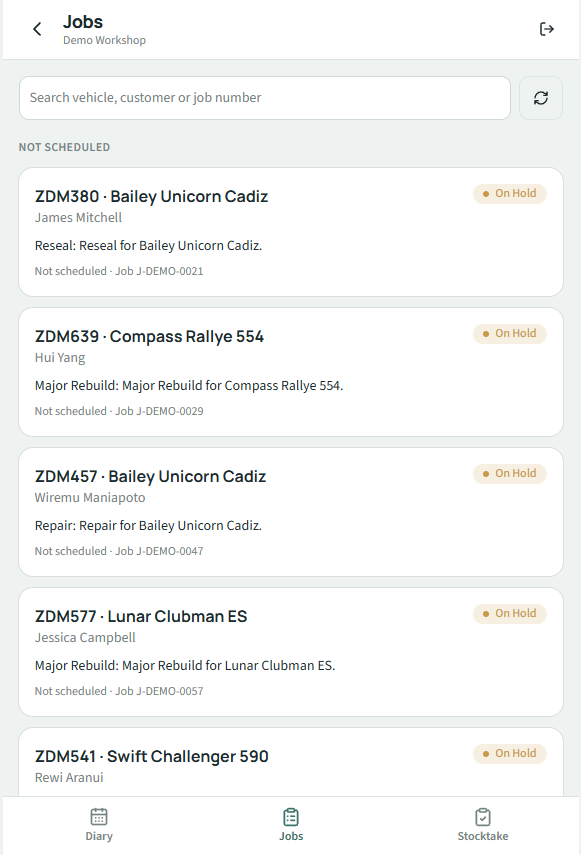
The technician app on a phone: a list of jobs, each with the van's rego and model, the customer, what needs doing and its status.

In the workshop, on their phone.

Technicians get a simple app that runs on any phone. Just open a link to install it, no app store needed. They see their jobs, tick off tasks, clock on and off, and add the parts they use.

  • Works even when the signal in the back shed doesn't.
  • They never see the money screens.
  • Stocktakes counted on the phone, straight off the shelf.
Why CaravanConcierge

Built here, for here.

Most workshop software is made overseas with car garages in mind. Ours is made in New Zealand for caravans, and you'll notice the difference.

Designed in New Zealand, for New Zealand

Dates the way we write them (day, month, year), prices in dollars with GST handled properly, and everything you print shows your local time. There's nothing to translate or work around, because it wasn't built for somewhere else.

Made for caravans, not cars

Car software treats a caravan like a car with a different badge. Here, the van is what everything hangs off. Every job, claim, certificate and conversation stays with the van, even when it's sold to someone new, so you always know its story.

Self-containment and annual service checks built in

If you're an NZ LifeStyle Camping assessor, fill in their form on screen and send it straight to them, with no paper to chase. You can also run a proper annual service check to catch maintenance problems early. Either way you set the issue and due dates, and your customers can see them.

Insurance and warranty claims without the shoebox

Follow each claim stage by stage, from gathering evidence through approval to the invoice. Insurer and manufacturer details live alongside it, and you can see at a glance which claims are still waiting on a reply.

Your customers get their own portal

Customers can log in to see their invoices, quotes, vehicles and messages, and reply without having to ring the workshop.

They can also check when their next service is due and look back over service history, photos and insurance claims.

Xero when you want it, standalone when you don't

Already use Xero? Connect it and every dollar flows across automatically. Prefer to keep it simple? Run your own accounts and GST right here. It's your call.

Switching is not a leap of faith

Coming from MechanicDesk? We'll bring your jobs, customers, invoices and stock across. And if someone makes a mistake later, an audit log shows who changed what and lets you undo it.

Using something else? Just ask. We can usually build an import from most other systems.

Safety looked after too

Keep your health and safety procedures in one place, with staff confirming they've read each version. Your equipment register tracks when every hoist, compressor and extinguisher is next due for service.

Everything in one place

From drop-off to pick-up, and all the paperwork in between.

Here's what you get, in plain terms.

Booking diary

Drag jobs onto the calendar, see who's working on what, and park work that isn't booked yet in a queue so nothing gets forgotten.

Jobs

Colour-coded job types, task lists, notes, and a history of every status change, with who made it. The most urgent jobs float to the top.

Pickup and collectionNew

See which vans are ready, which customers haven't been told yet (with their number to tap), and how long each van has been waiting.

Needs attentionNew

Jobs that look finished but were never marked complete, and bookings with nothing written down, all in one list on the home screen.

Quotes and invoices

Put them together quickly, and if you've agreed a price with the customer, just type the total. Send a tidy PDF with your own branding.

Payments and credit notes

Record payments, hand out credit when you need to, and always know exactly who owes what.

Bills and purchase orders

Order parts from your suppliers, receive them when they arrive, and check the bill matches what you actually ordered.

Inventory and stocktakes

Keep track of your parts, what you pay, what you charge and who you buy from. Count stock on a phone and apply it in one go.

Workshop floor mapNew

A plan of your site with bays, yard spots, exits and safety gear. Print an evacuation poster or visitor sheet from it.

Equipment registerNew

Every hoist, compressor and extinguisher, with its service schedule and a reminder on the home screen when it's due.

Health & SafetyNew

Versioned procedures your staff read and confirm, and a matrix showing who has confirmed what.

Customers and caravans

One home for each person and each van, linked to everything that's ever happened to them.

Communications

Emails, notes and messages are filed against the right customer and van, and a simple list shows who's still waiting to hear back from you.

Outlook add-in

Save an email to the right customer with one click from Outlook, or send a supplier's bill straight in for checking.

Folder watcher

Drop supplier bills into a folder on the office computer and they show up ready to check, with the text already read for you.

Reports and GST set-aside

See how the business is really going, plus a running estimate of how much GST to put aside each week.

Roles and permissions

Owners, admins, front desk and technicians each see just what they need, so your techs don't wander into the money screens.

Two-factor sign-in

An extra security step for owners and admins, using an authenticator app on their phone, to keep your business data safe.

Document templates

Make your invoices and quotes look like they came from your business, not from software.

Themes for everyone

Choose a colour palette, light or dark, and a bigger text size. Each person's choice follows them to any computer.

Our story

Built by people who know the trade.

CaravanConcierge started life in a real, family-run caravan workshop in New Zealand. Every screen is there because someone on the shop floor asked for it, so you won't find features nobody needs.

Want to see it?

Get in touch and we'll walk you through it using the kind of jobs your workshop actually does. No pressure, just a chat.

Contact us for a demo